Using a temporary email address is a simple, powerful way to safeguard your primary inbox from spam, data breaches, and unwanted marketing. This guide walks you through exactly how to use temp mail for online accounts, from choosing a reputable provider to understanding its perfect use cases and critical limitations. You’ll learn practical steps to sign up for websites, download resources, and create throwaway accounts without compromising your real identity or cluttering your main email. It’s an essential tool for anyone looking to take control of their digital footprint.
Have you ever signed up for a free ebook, a gaming forum, or a one-time discount and instantly regretted it as your inbox flooded with promotional emails? Or maybe you’ve been hesitant to create an account on a sketchy-looking website, fearing what they might do with your email address. You’re not alone. In today’s data-driven world, our email addresses are golden tickets for marketers, data brokers, and sometimes, bad actors. But what if you could have a secret, throwaway email address just for those moments? Enter the world of temporary email, or “temp mail.” It’s a straightforward tool that acts like a digital bodyguard for your primary inbox. This guide will walk you through everything you need to know about how to use temp mail for online accounts, turning you from a cautious newcomer into a savvy, privacy-conscious user.
Key Takeaways
- Temp mail provides a disposable email address for one-time or short-term use, shielding your primary email from spam and data collection.
- It is perfect for signing up to websites, forums, or downloads where you don’t trust the sender or expect long-term communication.
- Never use a temporary email for critical accounts like banking, primary social media, or any service requiring secure password recovery.
- Always check the temp mail provider’s policy on email duration and attachment handling, as these vary significantly.
- The core benefit is privacy and inbox hygiene, not security against targeted attacks or malware.
- Combine temp mail with a password manager and good browsing habits for a comprehensive privacy strategy.
- Understand that once the temp inbox expires, access to that account is permanently lost.
📑 Table of Contents
- What Exactly is Temporary Email (Temp Mail)?
- The Major Benefits: Why You Should Consider Using Temp Mail
- Step-by-Step Guide: How to Use Temp Mail for Online Accounts
- Perfect Use Cases: When to Definitely Use Temp Mail
- Critical Limitations and Risks: When NOT to Use Temp Mail
- Best Practices for Safe and Effective Use
- The Future of Temp Mail and the Privacy Landscape
- Conclusion: Your Digital Shield Awaits
What Exactly is Temporary Email (Temp Mail)?
Let’s start with the basics. Temporary email is a service that provides you with a random, disposable email address for a very short period—usually anywhere from 10 minutes to 48 hours. Think of it like a burner phone, but for your email. You don’t need to register, provide a password, or give any personal information to get one. You simply visit a temp mail website, and it generates an address for you, like [email protected].
The Core Mechanics: How It Works Under the Hood
These services operate on a simple principle. When you visit a site like Temp-Mail.org or 10MinuteMail.com, the server assigns you an unused email address from a large pool. Any emails sent to that address are stored on their servers and displayed in a web-based inbox that only you can see, identified by a unique session ID or the address itself. There’s no forward to your Gmail. Once the time limit is up, or you close the browser tab, that address is either recycled or destroyed, and the inbox is wiped clean. It’s designed for anonymity and impermanence.
Key Characteristics of a Temp Mail Address
- No Registration: You never create an account. The address is yours for the session.
- Automatic Deletion: The inbox and address expire after a set time.
- Public Inboxes: Technically, if someone else was given the same random address (rare on reputable sites), they could see your emails. This is why you never use it for anything sensitive.
- Web-Based Only: You typically check the inbox on the provider’s website. Most don’t offer POP/IMAP access for email clients.
The Major Benefits: Why You Should Consider Using Temp Mail
So, why go through the extra step? The benefits are compelling, especially if you value your privacy and sanity. Using a temporary email address for online accounts isn’t about being paranoid; it’s about being practical and proactive in managing your digital identity.
Visual guide about How to Use Temp Mail for Online Accounts
Image source: tmailor.com
Benefit 1: Slash Inbox Spam Forever
This is the number one reason people use temp mail. Every time you use your real email to sign up for a newsletter, a free trial, or a forum, you’re trusting that company to handle your data responsibly. Many sell email lists to advertisers or have weak security that gets hacked. By using a temp address, you create a firebreak. All that promotional clutter and potential phishing attempts go to an inbox that vanishes in an hour. Your primary email, used for family, friends, and work, stays pristine.
Benefit 2: Enhance Your Online Privacy
Every account you create is a data point tied to your identity. Companies build profiles based on your email address, tracking your activity across sites. A temp mail address severs that direct link. For accounts that require an email but aren’t core to your identity, using a disposable address minimizes the data trail you leave behind. It’s a small but effective step towards a more private digital life.
Benefit 3: Bypass Mandatory Sign-Ups
How many times have you abandoned a download because the website demanded your email? A temp mail lets you get that PDF, software trial, or whitepaper without sacrifice. You enter the disposable address, receive the download link in the temporary inbox, grab your file, and walk away. No strings attached.
Benefit 4: Test Services Risk-Free
Want to try a new SaaS tool or app that requires an email to activate the free trial? Use temp mail. If you decide you don’t like the service, you simply ignore the trial expiration emails. There’s no risk of being charged if you forget to cancel because you can’t receive the renewal notification in the first place. It’s a perfect way to test-drive without commitment.
Step-by-Step Guide: How to Use Temp Mail for Online Accounts
Alright, theory is good, but let’s get practical. Here is a detailed, foolproof process for using temp mail effectively and safely.
Visual guide about How to Use Temp Mail for Online Accounts
Image source: dl.memuplay.com
Step 1: Choose a Reputable Temp Mail Provider
Not all temp mail services are created equal. You want one that is reliable, has a decent uptime, and offers a clear expiration time. Popular, established options include Temp-Mail.org, 10MinuteMail.com, and Guerrilla Mail. Avoid obscure sites that might be shady or inject ads aggressively. Look for a clean interface and a clear countdown timer.
Step 2: Generate Your Disposable Address
Navigate to the provider’s website. You will immediately see a randomly generated email address on the screen. It will look something like [email protected]. Copy this address to your clipboard. You’ll also see the countdown timer begin (e.g., 10:00). This is your window.
Step 3: Use the Temp Address to Sign Up
Go to the website where you want to create an account. In the email field, paste your temporary address. Fill in any other required details (username, password—use a unique one for this site!). Complete the sign-up process. If the site sends a verification email, you will need to receive it in your temp inbox to activate the account.
Step 4: Access Your Temporary Inbox
After signing up, stay on the temp mail provider’s tab. Do not close it! Refresh the page periodically. Within a minute or two, you should see an email from the website you just signed up for appear in your temp inbox list. Click on it to view the contents. Look for the verification link or the download link you need.
Step 5: Complete the Action and Forget
Click the verification link to confirm your account. Download the file you wanted. Once you’ve gotten what you needed, you can usually close the browser tab. The address and its inbox will expire automatically. There is no need to “delete” anything. You simply forget about it. The account you created with that temp email will become inaccessible once you need to reset a password or receive a notification, as those emails will go to a dead address.
Perfect Use Cases: When to Definitely Use Temp Mail
Knowing *how* to use it is one thing; knowing *when* is just as important. Here are the ideal scenarios where temp mail shines.
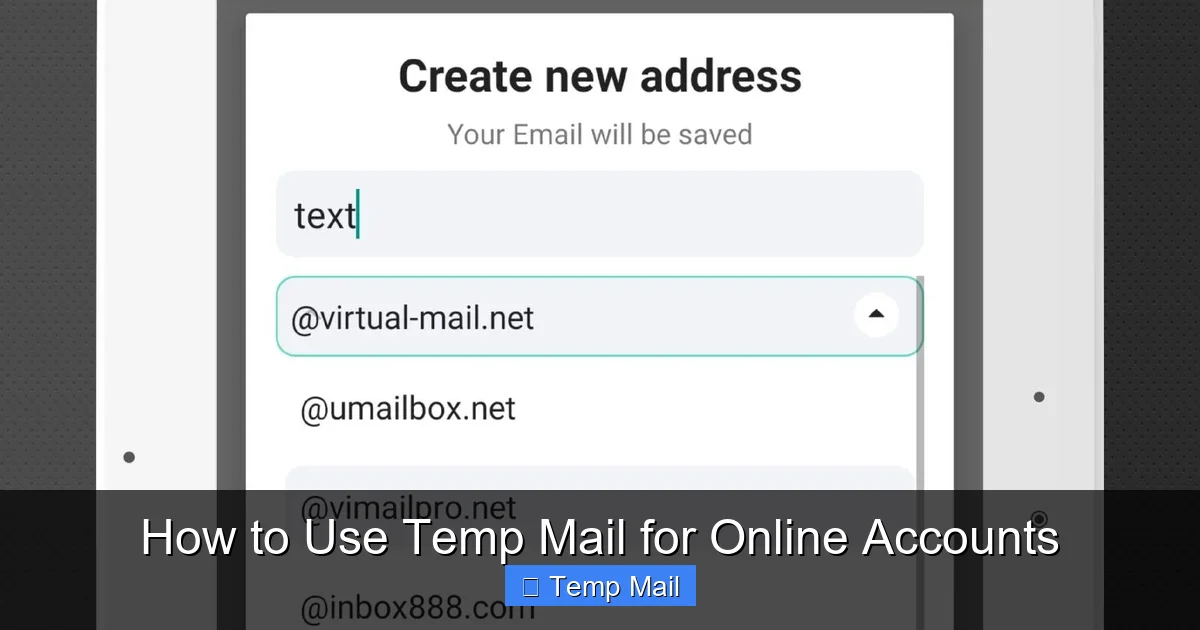
Visual guide about How to Use Temp Mail for Online Accounts
Image source: image.winudf.com
For Downloading Gated Content
This is the quintessential use case. Ebooks, research papers, templates, and software trials that require an email exchange are perfect candidates. You get the content, and your inbox avoids the inevitable follow-up spam.
For One-Time Forum or Commenting Access
Need to post a question on a technical forum or comment on a news article that requires registration? Use temp mail. You gain the ability to participate without creating a permanent identity on that platform or getting sucked into their digest emails.
For Testing New Apps and Websites
As mentioned, it’s ideal for trying out a new service. You can explore the features during the trial period without worrying about managing the cancellation later. If you love it, you can always sign up properly with your real email later.
For Accessing Public Wi-Fi Networks
Some airports, cafes, or hotels require you to “register” with an email to get the Wi-Fi password. A temp mail address is perfect for this. You get online, and the provider gets a dummy email. No long-term relationship is formed.
For Avoiding “Email Harvesting”
If you’re posting your email on a public webpage (like a Craigslist ad) or in a forum signature, using a temp address can prevent bots from scraping it and adding you to spam lists. Just be aware you won’t receive legitimate replies there either, so use a dedicated temp mail for this purpose and check it frequently for a short period.
Critical Limitations and Risks: When NOT to Use Temp Mail
Temp mail is a fantastic tool, but it’s not a universal replacement for your primary email. Using it incorrectly can lead to serious headaches. Understanding its limitations is crucial.
Limitation 1: No Account Recovery
This is the most important rule. If you use a temp email to sign up for an account you *actually want to keep*, and you forget your password, you are locked out forever. There is no “forgot password” email because the inbox no longer exists. You will lose access to that account permanently. Therefore, **never** use temp mail for:
- Banking, financial services, or cryptocurrency accounts.
- Your primary email account itself (Gmail, Outlook, etc.).
- Important cloud storage (Dropbox, Google Drive).
- Any social media account you wish to maintain long-term (Facebook, Instagram, LinkedIn).
- Work or school-related accounts.
Limitation 2: Security and Trust Issues
Temp mail providers themselves are not secure vaults. The inboxes are often not encrypted. A determined hacker could potentially access the provider’s server and view all emails in a given temporary inbox if they knew the address. More importantly, many reputable websites block known temp mail domains from signing up because they are associated with fraud and spam. You might find the “Sign Up” button disabled on certain sites.
Limitation 3: No Attachments or Limited Support
Many temp mail services either block attachments entirely or have very small size limits. If the website you’re signing up with sends a confirmation PDF or a digital receipt, you might not be able to receive it. Always check the provider’s policy.
Limitation 4: Reputation and Blacklisting
Because temp mail domains are used for spam, they often get blacklisted by major email providers. If you use a temp address to sign up for a legitimate service, that service’s outgoing emails (like a welcome series) might get sent to your spam folder, or worse, the service might blacklist the entire temp mail domain, preventing anyone from using it to sign up in the future.
Best Practices for Safe and Effective Use
To get the most out of temp mail without falling into its traps, follow these best practices.
Practice 1: Use a Dedicated, Reputable Provider
Stick to the well-known names mentioned earlier. They are more likely to have stable uptime and clear policies. Have 2-3 bookmarked that you rotate between.
Practice 2: Never Mix Tabs or Windows
When working with a temp mail session, keep that browser tab isolated. Do not open other links from the temp inbox in the same tab unless you are sure they are safe. A malicious link could try to phish your other active sessions or install malware. It’s best to copy a link and paste it into a new, private browsing window if you need to click through.
Practice 3: Be Aware of the Countdown Timer
The timer is your boss. As soon as you generate the address, the clock starts. If you need to receive a verification email, don’t start a sign-up process with only 2 minutes left on the clock. Ensure you have at least 10-15 minutes of session time before beginning.
Practice 4: Clear Your Browser Cache After Use
Once you’re done with a temp mail session, close the tab and clear your browser’s cache and cookies for that site. This ensures no session data lingers, which is a good habit for privacy overall.
Practice 5: Have a Fallback Plan
What if the temp mail service is down when you need it? Have a secondary provider bookmarked. Also, understand that if a critical service (like a government portal) absolutely requires a verified, permanent email, you must use your real one. Temp mail is for low-stakes, non-critical interactions.
The Future of Temp Mail and the Privacy Landscape
The tension between data-hungry services and privacy-conscious users is only growing. Temp mail is a reactive tool in this landscape. We’re seeing more websites employ advanced bot detection and block entire ranges of temp mail domains. In response, temp mail services are becoming more sophisticated, offering browser extensions and APIs. The broader trend is towards greater user control over data, with regulations like GDPR and CCPA giving users more rights. However, the fundamental model of the internet—where email is a key to identity—remains. Until a better, standardized, and truly private identity system emerges, disposable email addresses will remain a vital, grassroots tool for inbox peace and digital autonomy. They empower you to engage with the web on your terms, deciding when and where to reveal your true identity.
Conclusion: Your Digital Shield Awaits
Learning how to use temp mail for online accounts is a small skill with an outsized impact on your daily digital life. It’s not about hiding from the world; it’s about choosing your battles. You now have a clear, actionable framework: use it for downloads, trials, and one-off interactions; never use it for anything you need to keep. By following the steps and best practices outlined here, you can dramatically reduce spam, protect your primary email from data breaches, and test new services without commitment. Start today. Bookmark a reputable provider, and next time you hit an email wall, smile and generate a disposable address. Take back control of your inbox, one temporary email at a time.
Frequently Asked Questions
Is using a temporary email address legal?
Yes, using a temporary email service is completely legal. These services operate within the law, providing a communication tool. However, using a temp mail address to commit fraud, bypass legal agreements, or impersonate someone is illegal, just as it would be with a permanent email.
Can I receive attachments in a temporary email?
It depends entirely on the specific temp mail provider. Many block attachments for security reasons, while others may allow small files (like PDFs or images) up to a certain size limit, often 1-2 MB. Always check the provider’s help section or FAQ before relying on it to receive an important attachment.
How long do temporary emails last?
The lifespan varies by provider. Common durations are 10 minutes, 1 hour, or up to 48 hours. Some services allow you to extend the time manually. The countdown timer is always displayed on the inbox page, so you know exactly when your address and all its emails will be permanently deleted.
Will a website know I’m using a temp mail address?
Yes, easily. The domain name (like @temp-mail.org) is a clear giveaway. Many websites actively check against databases of known disposable email domains and will block sign-ups from those addresses to prevent spam and abuse on their platforms.
Is my activity while using temp mail anonymous?
It offers a high degree of anonymity *from the website you are signing up for*, as they only see the disposable address. However, your activity is not anonymous from the temp mail provider itself. They can see the IP address accessing the inbox and the emails being received. Reputable providers claim not to log this data, but you are ultimately trusting them. For true anonymity, you would need to use a VPN alongside the temp mail.
What should I use instead of temp mail for important accounts?
For any account you need to keep long-term, recover, or that involves security (banking, main email, primary social media, work tools), you must use a secure, permanent email address from a reputable provider like Gmail, Outlook, ProtonMail (for enhanced privacy), or your ISP’s email service. Consider using a unique email alias or a separate “signup” email address that you check occasionally, but which is still permanent and recoverable.
Leave a Reply